WHAT IS IT
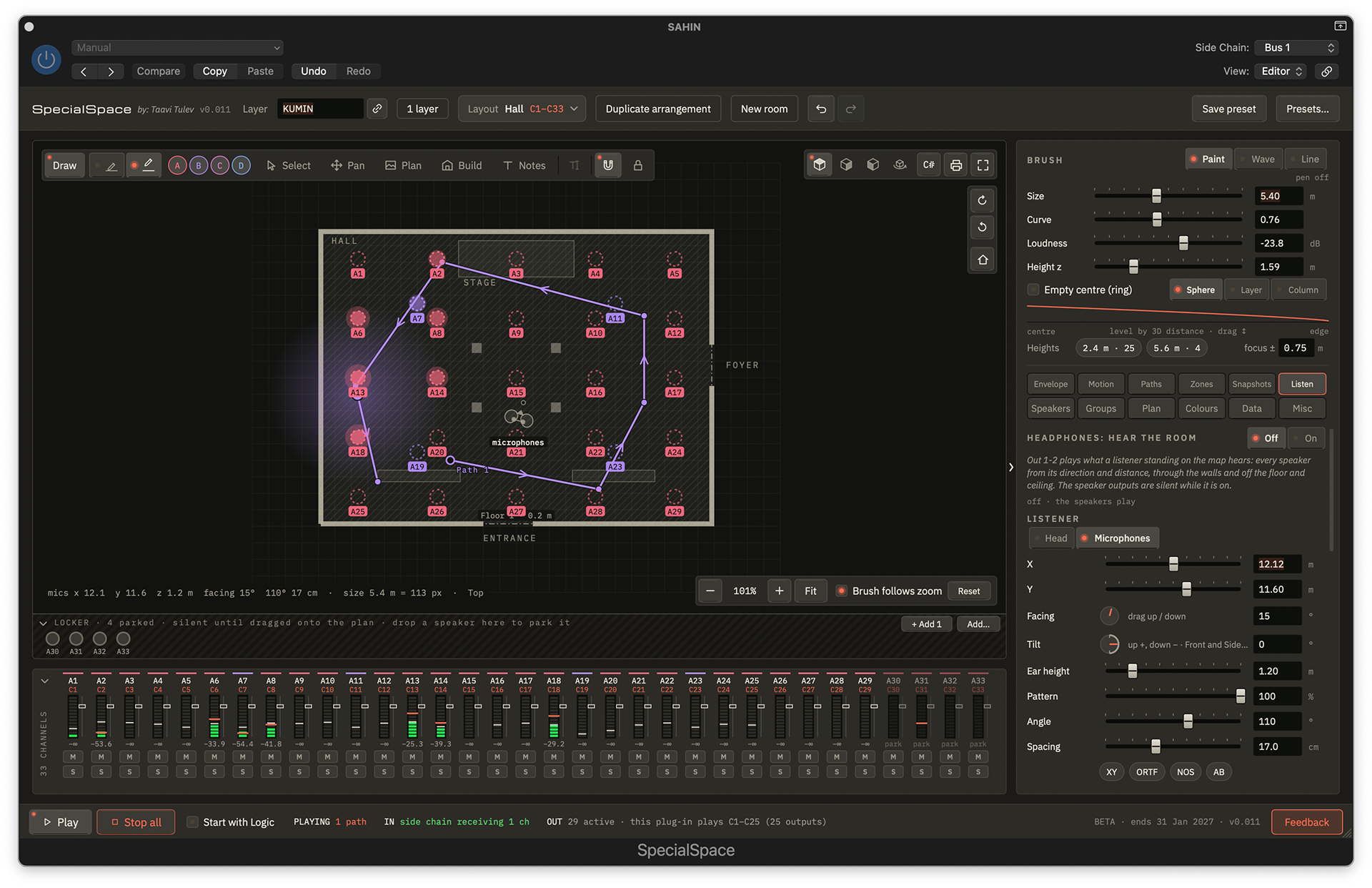
SpecialSpace is an instrument plug-in I made for Logic Pro that lets you paint sound across the speakers of a real room. You draw the room, place the speakers where they stand, and move the sound over them with a brush.
It takes the audio Logic sends it on a bus and plays it from its own outputs, one per speaker. Each speaker gets louder the closer it is to the brush, and walls can block the sound as they do in the building.
You can move sound by hand, send waves and lines across the room, run it along drawn paths, or play zones and points from a MIDI keyboard. Store the whole map as snapshots and morph between them. Brush position, size, envelope and most settings can be automated in Logic.
On headphones, a listener stands on the map and hears the room: a dummy head or a pair of microphones, with direction, distance, walls and floor reflections. You can rehearse a speaker installation at your desk before you reach the venue.
Templates cover 16 venues, 40 speaker formats from 2.0 to 24.1.10, and ambisonic domes up to 64 speakers. When the design is done, print a scaled PDF speaker plan for the installers, or export the layout as CSV or for the IEM Plug-in Suite.
Who it is for
Sound designers plan a speaker system on the real floor plan, hear it on headphones before the site visit, compose movement for installations, exhibitions, theatre and venues, then calibrate on site and hand over a scaled PDF plan.
Producers move a sound across a multichannel speaker set in Logic Pro, from 2.0 to 24.1.10 and ambisonic domes, lock the movement to the song's tempo, play it from a MIDI keyboard and record it as ordinary Logic automation.
Features
- Paint sound with a brush. Set size, curve, loudness and height, and shape how speakers fade in and out with an envelope: attack, decay, sustain and release.
- Draw the building. Import a floor plan image, scale it to a known distance and trace walls, lines and openings. Each wall either blocks sound or lets it through.
- Waves and lines. A wave spreads as a ring and bounces off the walls. A line travels across the room.
- Paths. Draw a path and run it once, in a loop or back and forth, free or locked to Logic's tempo in note values from 1/16 to 4 bars, including dotted and triplets.
- Play it from MIDI. Zones and brush points answer notes, velocity sets the level, and every speaker can answer its own note.
- Snapshots. Store the whole map and glide between scenes. The morph between snapshots can be automated.
- 3D rooms. Ceiling, floor and balcony speakers, with Top, Front, Side and 3D views and Sphere, Layer and Column brush shapes.
- Headphone listener. A dummy head or a pair of microphones stands on the map and hears direction, distance, walls and floor reflections.
- Groups and calibration. Up to 16 speaker groups with mute, solo, trim and colour, a volume and meter per speaker, and pink noise for commissioning on site.
- One output per speaker. Mono or stereo, so each speaker can carry its own plug-ins in Logic.
- Templates. 16 venues, 40 speaker formats and ambisonic domes up to 64 speakers.
- Hand-over and export. A scaled PDF speaker plan with channel numbers and contact details, a speaker CSV, room files and the layout for the IEM Plug-in Suite.
- Logic automation. Brush X, Y, height and pen are recorded as ordinary automation, together with most settings.
- Draw the building. Import a floor plan image, scale it to a known distance and trace walls, lines and openings. Each wall either blocks sound or lets it through.
- Waves and lines. A wave spreads as a ring and bounces off the walls. A line travels across the room.
- Paths. Draw a path and run it once, in a loop or back and forth, free or locked to Logic's tempo in note values from 1/16 to 4 bars, including dotted and triplets.
- Play it from MIDI. Zones and brush points answer notes, velocity sets the level, and every speaker can answer its own note.
- Snapshots. Store the whole map and glide between scenes. The morph between snapshots can be automated.
- 3D rooms. Ceiling, floor and balcony speakers, with Top, Front, Side and 3D views and Sphere, Layer and Column brush shapes.
- Headphone listener. A dummy head or a pair of microphones stands on the map and hears direction, distance, walls and floor reflections.
- Groups and calibration. Up to 16 speaker groups with mute, solo, trim and colour, a volume and meter per speaker, and pink noise for commissioning on site.
- One output per speaker. Mono or stereo, so each speaker can carry its own plug-ins in Logic.
- Templates. 16 venues, 40 speaker formats and ambisonic domes up to 64 speakers.
- Hand-over and export. A scaled PDF speaker plan with channel numbers and contact details, a speaker CSV, room files and the layout for the IEM Plug-in Suite.
- Logic automation. Brush X, Y, height and pen are recorded as ordinary automation, together with most settings.
How it works
1. In a DAW, load SpecialSpace as an instrument, the Multi Output version, and send the sound you want to place to a bus.
2. Pick that bus in the plug-in's Side Chain menu and route each speaker output to your audio interface.
3. Draw a room, or start from a template, and place the speakers where they stand.
4. Paint with the brush, or let waves, paths, MIDI and snapshots move the sound, and record the movement as automation.
2. Pick that bus in the plug-in's Side Chain menu and route each speaker output to your audio interface.
3. Draw a room, or start from a template, and place the speakers where they stand.
4. Paint with the brush, or let waves, paths, MIDI and snapshots move the sound, and record the movement as automation.
Beta
Beta 0.011 runs in Logic Pro on macOS 11 or newer, on Intel and Apple Silicon Macs, until 31 January 2027. Feedback goes in through the Feedback button inside the plug-in.
For beta testing, please write to me directly!
For beta testing, please write to me directly!